Drag Photoshop Selections Between Documents.

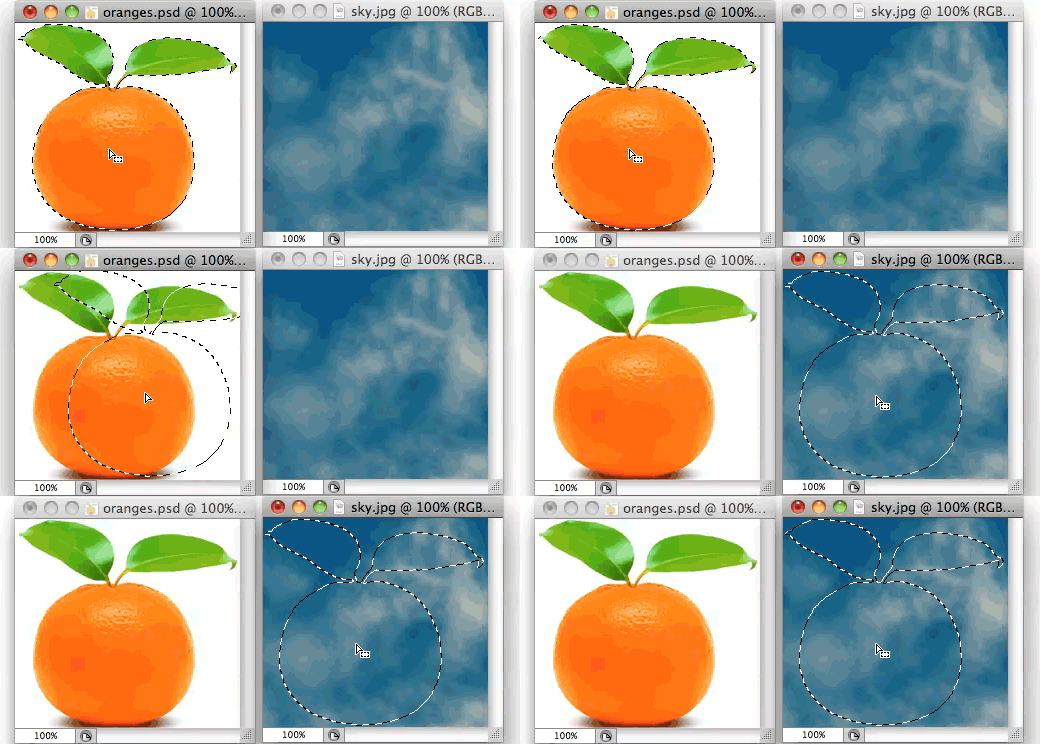
 I’m always delighted when I discover basic Photoshop techniques I missed along the way. We all know you can drag selected pixels from one window into another. Somehow I missed that if you drag that same selection while using one of Photoshop’s selection tools, you can drag the selection itself (with no pixels) over into a new document.
I must have known this at some point, but I’d obviously forgotten because I have a clumsy method I’ve used for years when I needed to copy selection outlines between documents. If this little tip saves anyone those extra steps, then revealing my personal ignorance was worth it.
Source: This is one of those little details I picked up during Jason Hoppe’s 5-Week Photoshop Fundamentals course. For as long as I’ve been using these tools, I still learn something new from almost every course I sit in on.
Not sure your Macs are ready for what’s next?
Book a free, no-pressure call. We’ll review your fleet, flag what needs attention, and you’ll leave with a plan either way.
Let’s Talk →Apple news worth your inbox.
One monthly note on the updates that actually affect your workplace. No noise.
Keep reading

Coming Soon: Most Pantone Color Books for Adobe Creative Cloud to Require Pantone Connect License

Find Wasted Space with Storage Management