Adobe Pen Tool Modifiers.

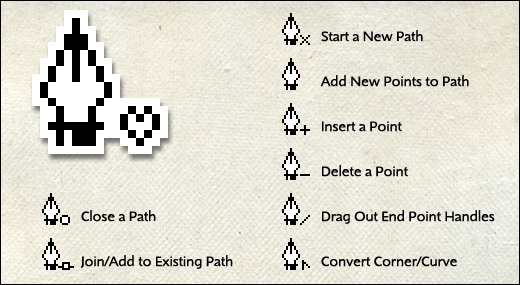
When you are drawing with the Adobe pen tool, keep an eye on those small modifiers that appear in the lower-right of the pen icon. They change as you use the pen tool depending on what you do or which part of a path you hover over.
If you are new to the pen tool (or want a quick refresher) print this handy cheat sheet and train yourself to pay attention to the subtle cursor changes. Once you get to know them, the different icons remind you of the action you are about to perform. Source: This tip (and the Pen Love icon) both come from Jason Hoppe’s class last week on using the pen tool in Photoshop. Drawing paths with the pen tool remains one of my favorite workshop topics.
Both Jason and I were wearing our Pen Love T-Shirts during class. In response to requests, we’ve created a CafePress store with T-Shirts, a mug, and other odd items that allow you to show off your own growing love of the pen tool!
CafePress: Pen Love T-Shirts
Not sure your Macs are ready for what’s next?
Book a free, no-pressure call. We’ll review your fleet, flag what needs attention, and you’ll leave with a plan either way.
Let’s Talk →Apple news worth your inbox.
One monthly note on the updates that actually affect your workplace. No noise.
Keep reading

Coming Soon: Most Pantone Color Books for Adobe Creative Cloud to Require Pantone Connect License

Find Wasted Space with Storage Management