
In Find My, You Can Now Share the Location of Lost Items


In Find My, You Can Now Share the Location of Lost Items
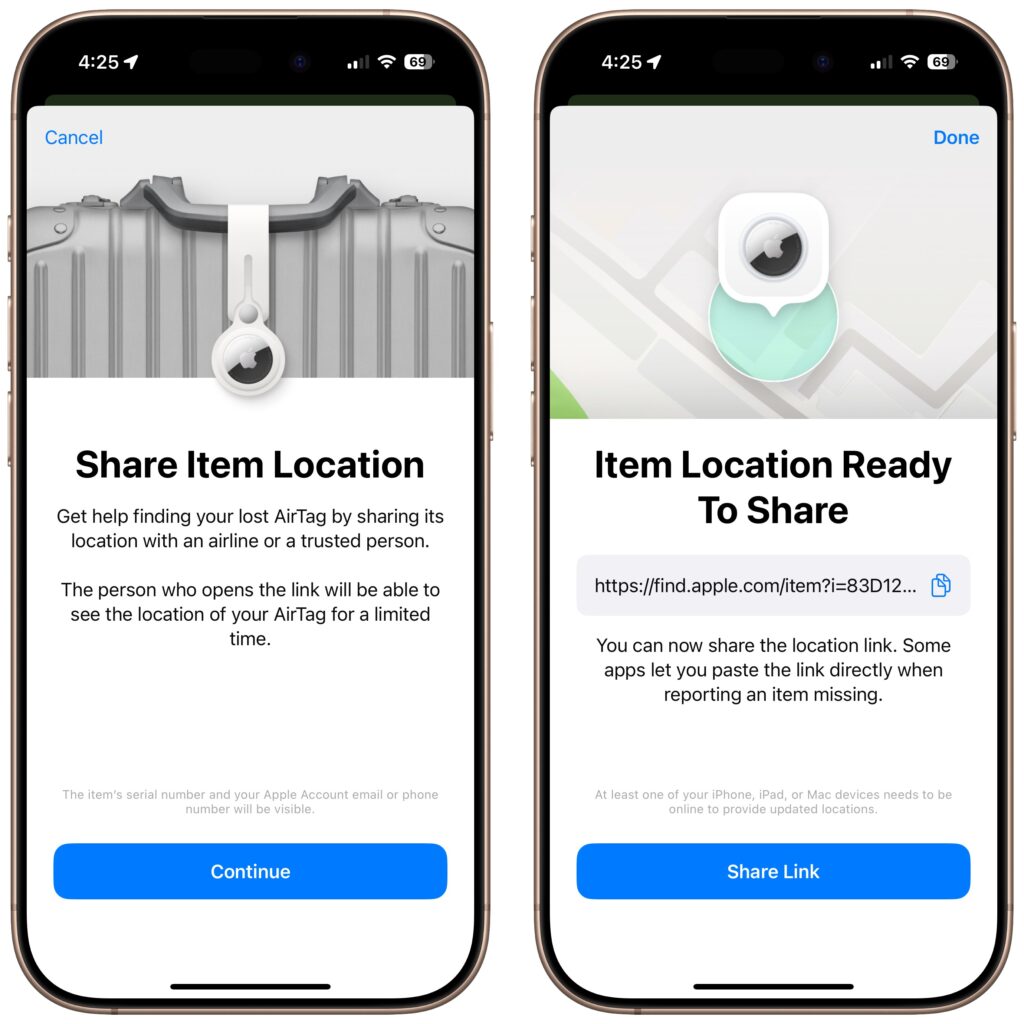
In iOS 18.2, Apple enhanced the Find My app, enabling you to create a temporary Web page that shares the location of a lost AirTag or other Find My-tracked item. You don’t need to know the person’s email address or share any other information, and the link automatically expires after a week. It’s a great way to enlist others in the search for a lost item, but the big win is sharing with an airline to help them track the location of misdirected luggage. It’s easy: open the Find My app, tap Items, select the desired AirTag or other item, tap Share Item Location, and then share the provided link via text message, email, or any other method. The item’s location automatically stops being shared if it’s reunited with you, or you can end sharing manually.
Read more:
Not sure your Macs are ready for what’s next?
Book a free, no-pressure call. We’ll review your fleet, flag what needs attention, and you’ll leave with a plan either way.
Let’s Talk →Apple news worth your inbox.
One monthly note on the updates that actually affect your workplace. No noise.
Keep reading
Intel-Based Apps Will Stop Working in macOS 28

Be Alert for Deepfake Phishing Scams
