
Did You Upgrade to iOS 15? Check Do Not Disturb in Focus Settings
<img src="https://www.creativetechs.com/wp-content/uploads/2021/10/after-upgrading-to-ios-15-check-do-not-disturb-in-focus-settings.jpg">In iOS 15 and iPadOS 15, Apple expanded the concept of Do Not Disturb to what it calls Focus. You can create a Focus for different types of activities, so only specific people and apps can break through your cone of silence at appropriate times. Focus subsumes the old Do Not Disturb functionality, and your […]


Did You Upgrade to iOS 15? Check Do Not Disturb in Focus Settings
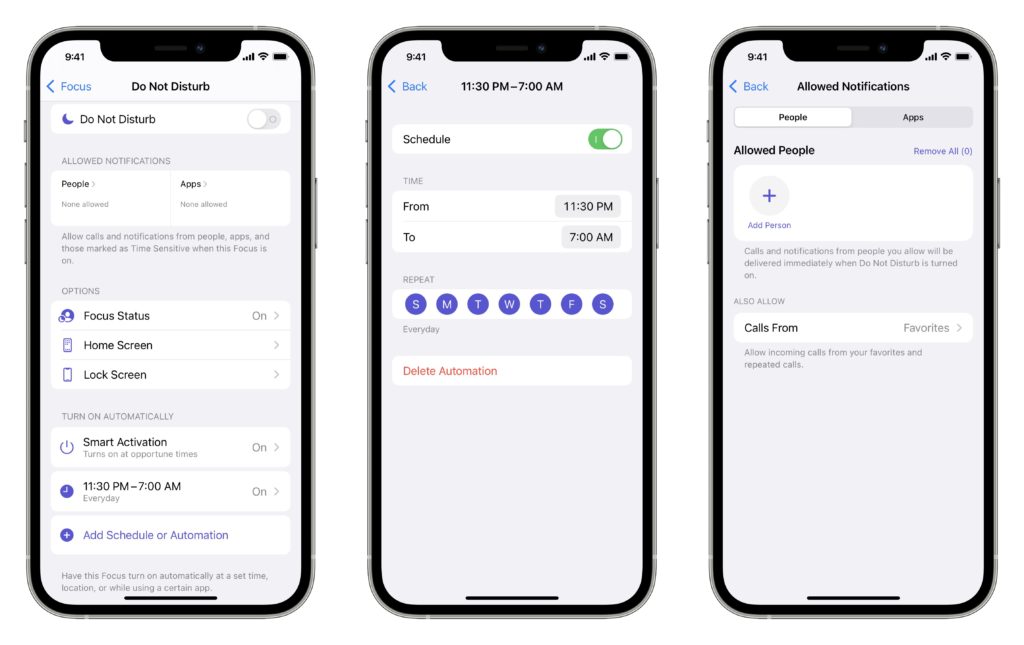
In iOS 15 and iPadOS 15, Apple expanded the concept of Do Not Disturb to what it calls Focus. You can create a Focus for different types of activities, so only specific people and apps can break through your cone of silence at appropriate times. Focus subsumes the old Do Not Disturb functionality, and your settings may not transfer when you upgrade, leaving you open to being woken at night by a previously silenced notification. To check and reset things to your liking, visit Settings > Focus > Do Not Disturb. If necessary, tap Add Schedule or Automation to set a schedule or try the new Smart Activation option. Then decide who, potentially beyond those in your Favorites, should be able to get through, along with any apps that might be essential. Note that you shouldn’t enable the Do Not Disturb switch at the top—that turns on the Do Not Disturb Focus immediately.
(Featured image by iStock.com/klebercordeiro)
Not sure your Macs are ready for what’s next?
Book a free, no-pressure call. We’ll review your fleet, flag what needs attention, and you’ll leave with a plan either way.
Let’s Talk →Apple news worth your inbox.
One monthly note on the updates that actually affect your workplace. No noise.
Keep reading
Intel-Based Apps Will Stop Working in macOS 28

Be Alert for Deepfake Phishing Scams
