
Did You Know You Can Save and Share Voicemail Files from Your iPhone?
For many of us, voicemail replaced answering machines, so we don’t think of voicemail messages as being something we can save or share.


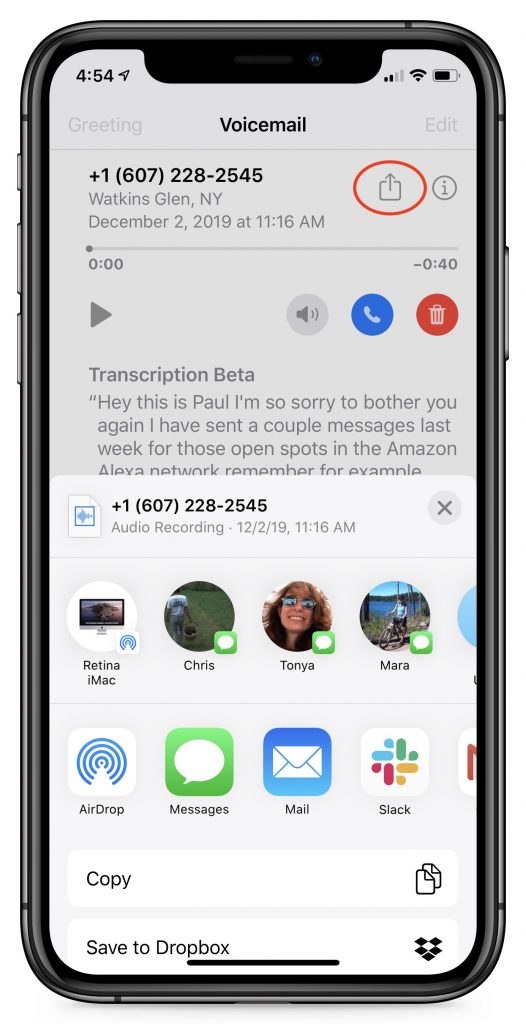
For many of us, voicemail replaced answering machines, so we don’t think of voicemail messages as being something we can save or share. But on the iPhone, every voicemail message is just an audio file. If you want to retain a message for posterity or share one with a friend or colleague, you can do that easily. While viewing a voicemail message, tap the share icon to bring up an activity sheet. In it, you can save the file to any app that can handle audio files, or share the file with AirDrop, Messages, Mail, or the like.
(Featured image by Travis Zimmerman from Pixabay)
A few more phone tips…
- iPhone Not Charging Reliably? Clean Its Lightning Port with a Toothpick
- To Prevent Spearfishing, Set a PIN or Passcode on Your Cell Phone Account
- The iPhone 11 Camera App’s Shutter Button Works Differently—Here’s How
- In Case of Emergency, Create an iPhone Medical ID
Not sure your Macs are ready for what’s next?
Book a free, no-pressure call. We’ll review your fleet, flag what needs attention, and you’ll leave with a plan either way.
Let’s Talk →Apple news worth your inbox.
One monthly note on the updates that actually affect your workplace. No noise.
Keep reading

Intel-Based Apps Will Stop Working in macOS 28

Be Alert for Deepfake Phishing Scams
