
Make Vacation Navigation Simpler with Favorite Addresses in Maps
Make your AirBNB a favorite in Maps before you even leave home.

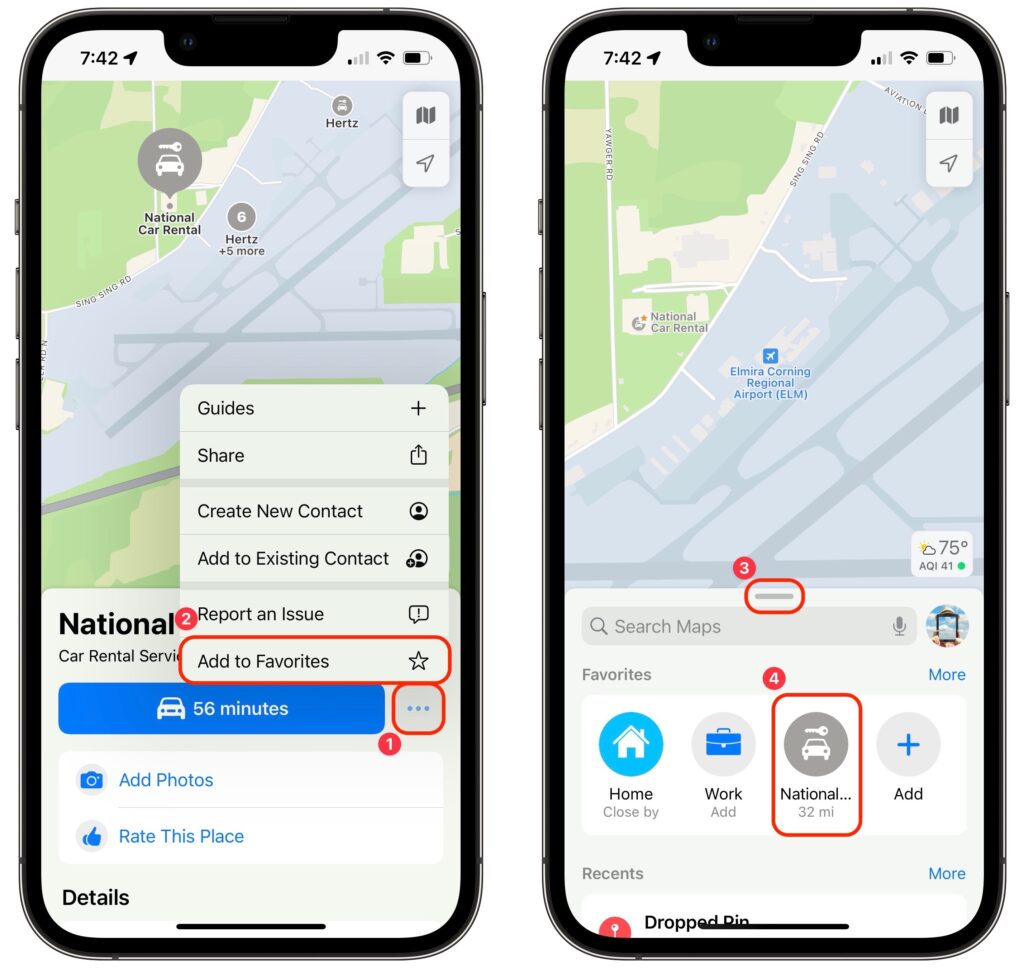
Imagine you’re on vacation, staying at an Airbnb and collecting tourist points in the surrounding area throughout the day. Since you’ll be heading back to your Airbnb regularly but may not remember its address reliably, it’s best to make it a favorite in Maps before you even leave home. That way, you can navigate to it easily without searching repeatedly or looking for it in your Recents list. Similarly, take a few minutes to add other addresses that you know you’ll need, such as the rental car dropoff spot. In Maps on the iPhone, tap the ••• button ➊ next to an address and then Add to Favorites ➋. Then, when it’s time to navigate, swipe up on the search handle ➌ and tap the favorite ➍ to get directions.
 (Featured image by iStock.com/Prostock-Studio)
Not sure your Macs are ready for what’s next?
Book a free, no-pressure call. We’ll review your fleet, flag what needs attention, and you’ll leave with a plan either way.
Let’s Talk →Apple news worth your inbox.
One monthly note on the updates that actually affect your workplace. No noise.
Keep reading

Moving to iPhone 18? Do These Things First So Nothing Gets Left Behind
Intel-Based Apps Will Stop Working in macOS 28
