
Did You Know You Can Use Your Mac Laptop Closed with an External Screen and Keyboard?

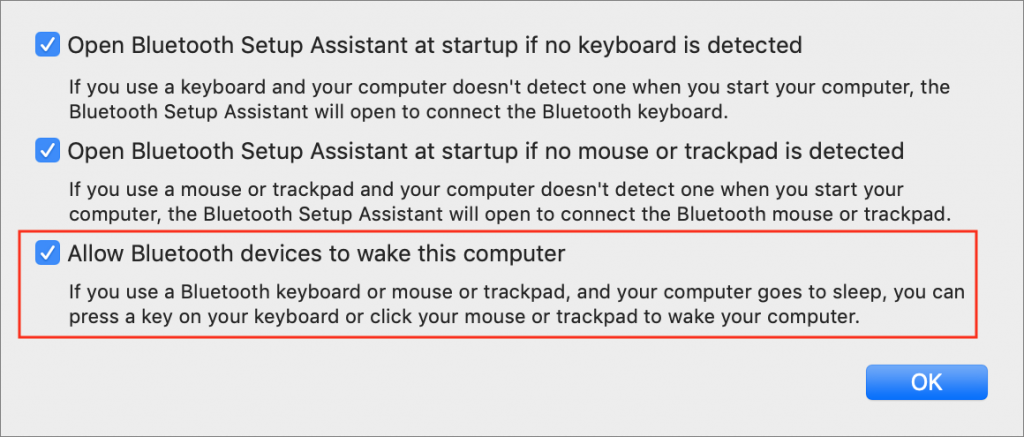
Those of you who use a Mac laptop—a MacBook, MacBook Air, or MacBook Pro—probably know you can connect it to a large external display for more screen space. But sometimes it’s not convenient to have your Mac open on your desk next to the big screen. If you’d like to close your Mac’s screen and just use the external display, you can! The trick to enabling closed-display mode is that your Mac must be plugged into an AC outlet and you must connect an external keyboard and mouse or trackpad—either USB or Bluetooth. (If you’re using any Bluetooth devices, go to System Preferences > Bluetooth > Advanced and make sure “Allow Bluetooth devices to wake this computer” is selected.)
Not sure your Macs are ready for what’s next?
Book a free, no-pressure call. We’ll review your fleet, flag what needs attention, and you’ll leave with a plan either way.
Let’s Talk →Apple news worth your inbox.
One monthly note on the updates that actually affect your workplace. No noise.
Keep reading
Intel-Based Apps Will Stop Working in macOS 28

Be Alert for Deepfake Phishing Scams
