Use Copy as Pathname to Help Someone Find a File on the Mac

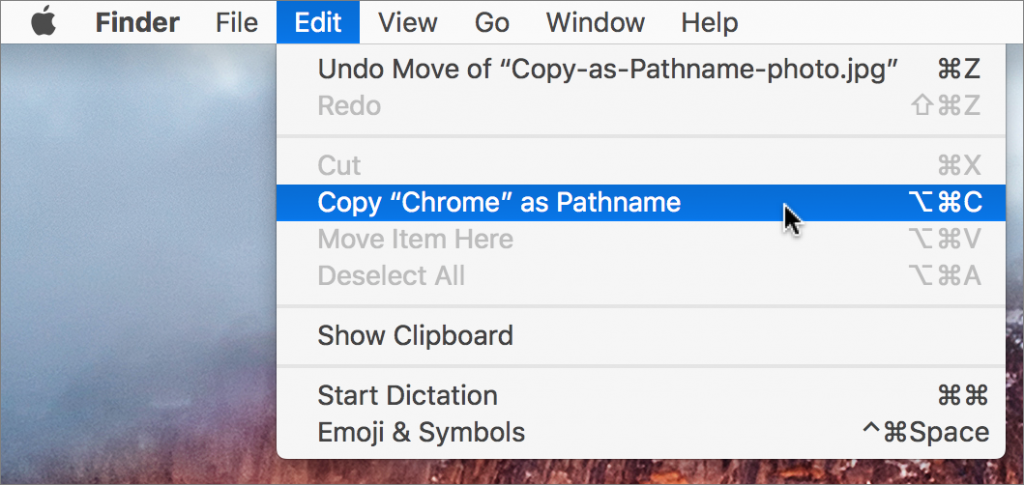
Have you ever needed to write directions for where to find a file on the Mac? That’s easy if it’s in a well-traveled location, like the Music or Pictures folder, but more difficult if it’s in an obscure hidey-hole. Rather than write out instructions like “Look in the Chrome folder inside Google’s Application Support folder in your user Library folder,” select the item in question, hold down the Option key, and choose Edit > Copy “ItemName” as Pathname. (A pathname, or path, is the sequence of nested folders that holds a file or folder, such as /Users/adrian/Library/Application Support/Google/Chrome.) Then paste the path into an email message or word processing document (or wherever you like). You’ll now have the entire thing exactly where you need it, and you don’t have to worry that you’ve accidentally left out a navigational step.
Not sure your Macs are ready for what’s next?
Book a free, no-pressure call. We’ll review your fleet, flag what needs attention, and you’ll leave with a plan either way.
Let’s Talk →Apple news worth your inbox.
One monthly note on the updates that actually affect your workplace. No noise.
Keep reading

Use Keyboard Shortcuts to Easily Insert Emojis

For Best Results, Keep Operating Systems Current