
Uncategorized
The New Two-Swipe Shortcut for the Camera in iOS 11

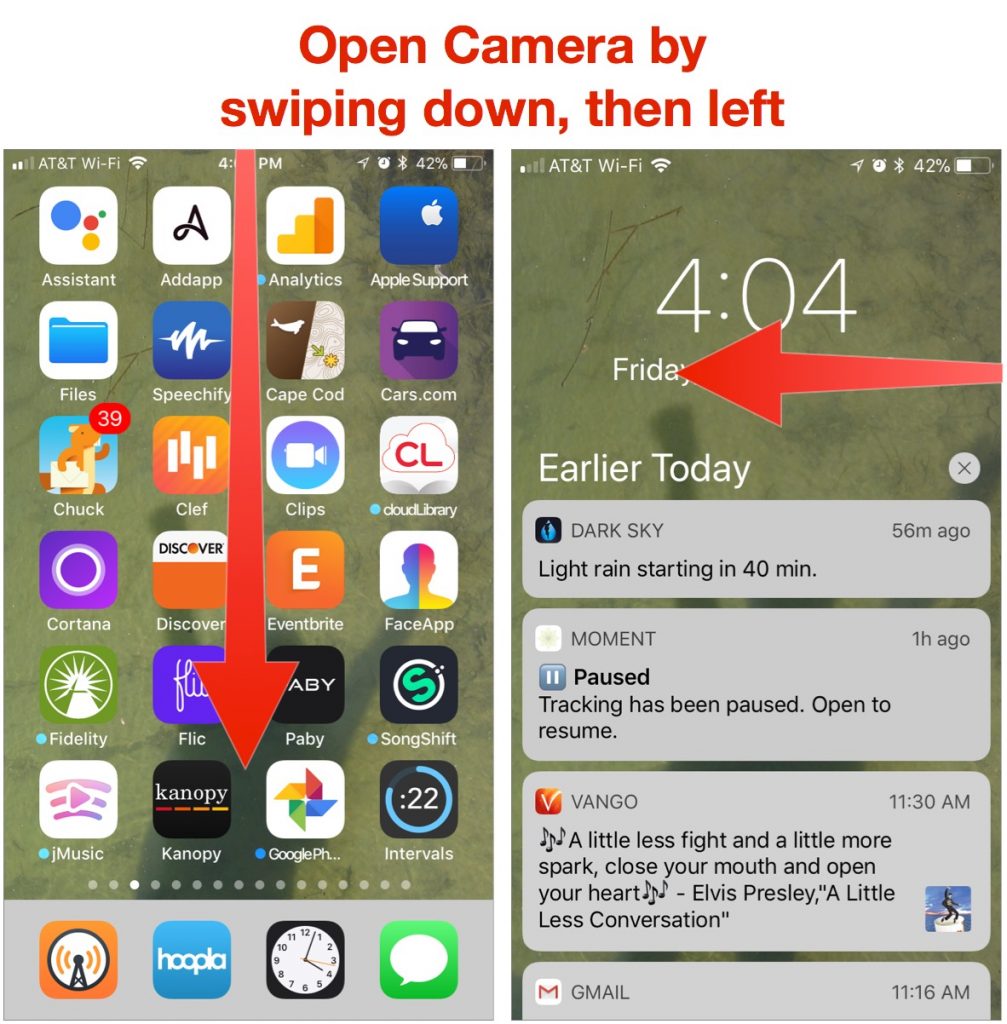
When you want to capture that perfect action shot or incriminating video, it’s a mad rush to open the Camera app as quickly as possible. That’s why Apple lets you get to the camera in multiple ways: by swiping left on the Lock screen, using the Camera button in Control Center, and tapping the Camera icon on the Home screen. iOS 11 adds another shortcut that could be useful: from within any app, swipe down from above the top of the screen to display the Lock screen, and then swipe left to get to the camera.
Apple Premium Technical Partner
Deep Apple expertise, wherever your team works.
Not sure your Macs are ready for what’s next?
Book a free, no-pressure call. We’ll review your fleet, flag what needs attention, and you’ll leave with a plan either way.
Let’s Talk →The CreativeTechs Way
Apple news worth your inbox.
One monthly note on the updates that actually affect your workplace. No noise.
Keep reading

Uncategorized
Never lose a Word document again
February 3, 2026 · 2 min read

Uncategorized
Don’t Miss Out: Claim Up to $1.25M in Tax Savings by Upgrading Your Tech Before Dec 31
October 31, 2025 · 2 min read
Uncategorized
Software Updates: Your Digital Immune System
October 23, 2025 · 2 min read